I had so much fun creating my self introductory Glog! Click here to learn more about me.
Learning Outcomes:
1. A Glog is a graphic blog. Glogster allows you to create interactive posters using images, video, audio, and text. You can also link images or text to the Internet.
2. There are many ways to use a Glog in the classroom. To begin with, I think it would be a fun way to replace interest surveys at the beginning of the school year. Students could create glogs answering questions such as their favorite subject, sport, and hobby. I also think it would be a great tool to use for reader response activities, history and science reports, and art projects. This would also be a great tool for teacher to use to create learning posters that students could access at any time.
3. ISTE/NETS
2a design or adapt relevant learning experiences that incorporate digital tools and resources to promote student learning and creativity. Glogs are a digital tool that would help promote student learning and creativity when used for any subject area.
3c.communicate relevant information and ideas effectively to students, parents, and peers using a variety of digital-age media and formats. Teacher cans use Glogs to help communicate with students and parents.
2c.customize and personalize learning activities to address students' diverse learning styles, working strategies, and abilities using digital tools and resources. I think using glogs in the classroom would be a great way to customize learning for individual abilities, learning styles, and work strategies. Glogs address many learning styles since audio,video, and text are used. Each student would have the opportunity to create individual Glogs addressing different abilities.
4. My only concern about using Glogster is the possibility that some public Glogs other people create may not be appropriate for students of all grade levels.
Thursday, September 16, 2010

Thursday, September 9, 2010
Self Portrait
Sleepy by Tracy: "Picassohead"
Picassohead is a unique site that allows you to create images using predetermined shapes. Most everyone creates likenesses of people, but in the gallery I did see someone who created a bird. I am not an abstract person so this was a bit challenging for me. I created more than one self-portrait before I was satisfied. To begin with, I hated all of the options for hair! So I made my own using masses of eyebrows. After adding twenty or so eyebrows I discovered that I could scale up each eyebrow to cover more space and give the appearance of thicker hair. Also, the noses seemed too bulbous or too angular. I don’t have a petite nose, but I don’t have a hefty nose either. Here I used the scale down option to create a more appealing nose. I guess I am too literal a person for Picassohead. Making the portrait itself was stirring after I had a vision of what I wanted to achieve. Trying to share the image has proven to be difficult.
I clicked on the share button on the web site and it gave me several options. First, I shared to Facebook, just for fun. Then I shared to my blog. All this accomplished was sharing a link to the image, not the image itself. I went back to see if there was a way to download the image, or copy it. I finally used the snipping tool to save the image so that I could share it here. I posted a question to the discussion board so hopefully someone else knows how to share from the website without snipping.

Picassohead is a unique site that allows you to create images using predetermined shapes. Most everyone creates likenesses of people, but in the gallery I did see someone who created a bird. I am not an abstract person so this was a bit challenging for me. I created more than one self-portrait before I was satisfied. To begin with, I hated all of the options for hair! So I made my own using masses of eyebrows. After adding twenty or so eyebrows I discovered that I could scale up each eyebrow to cover more space and give the appearance of thicker hair. Also, the noses seemed too bulbous or too angular. I don’t have a petite nose, but I don’t have a hefty nose either. Here I used the scale down option to create a more appealing nose. I guess I am too literal a person for Picassohead. Making the portrait itself was stirring after I had a vision of what I wanted to achieve. Trying to share the image has proven to be difficult.
I clicked on the share button on the web site and it gave me several options. First, I shared to Facebook, just for fun. Then I shared to my blog. All this accomplished was sharing a link to the image, not the image itself. I went back to see if there was a way to download the image, or copy it. I finally used the snipping tool to save the image so that I could share it here. I posted a question to the discussion board so hopefully someone else knows how to share from the website without snipping.

The more I look at it the more it looks like Michael Jackson to me. I don't look like Michael Jackson in real life! :)
ISTE/NETS
2a. design or adapt relevant learning experiences that incorporate digital tools and resources to promote student learning and creativity. If this assignment doesn't promote creativity I don't know what would!
3a.demonstrate fluency in technology systems and the transfer of current knowledge to new technologies and situations. Because I had to use the snipping tool to share my image in this blog post I consider that the transfer of current knowledge to new situations.
Wednesday, September 8, 2010
Learning Styles: The results!
I must say that the results of my test surprised me! And to be honest, I'm not really sure I agree with them. Or maybe the test results are accurate, but the descriptions of the learning styles don't coincide with the test very well. Maybe my interpretation of the different learning styles is wrong. And of course, it is possible that I am wrong about how I learn. It distresses me that my predictions and my test results were so different. My results were as follows:
I have a mild Aural Learning Preference. (This is what my results said.)
Aural: 8
Read/Write: 6
Kinesthetic: 4
Visual: 3
Being a social learner was not an option on this test. But I would have never labeled myself as a Aural learner. Even though I enjoy music very much, I have very little musical talent. The description of an Aural learner does not sound like me at all.
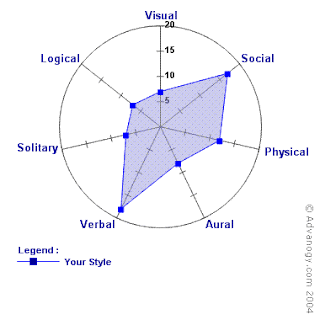
This was so disturbing to me I decided to do more investigating. I went back to the original site that described the different learning styles. They had their own free inventory to take. (Although, taking their test signs you up for a newsletter, you can unsubscribe to it at any time.) I went ahead and took their test. Here are my results.
I have a mild Aural Learning Preference. (This is what my results said.)
Aural: 8
Read/Write: 6
Kinesthetic: 4
Visual: 3
Being a social learner was not an option on this test. But I would have never labeled myself as a Aural learner. Even though I enjoy music very much, I have very little musical talent. The description of an Aural learner does not sound like me at all.
This was so disturbing to me I decided to do more investigating. I went back to the original site that described the different learning styles. They had their own free inventory to take. (Although, taking their test signs you up for a newsletter, you can unsubscribe to it at any time.) I went ahead and took their test. Here are my results.

The results of their test were much closer to my self assessment. Which makes sense to me since I was using their descriptions of learning styles. They rated me as follows:
Verbal: 18
Social: 17
Physical: 12
Aural: 8
Visual / Solitary / Logical all ranked 7
Maybe I'm a total dork for doing this, but I was really disturbed to think that I didn't know myself well enough to predict my styles of learning. I'm not really sure what that would say about me as an educator.
I think it is important to be aware of your learning style. Knowing how I learn best, obviously helps me to learn. Since I am a verbal, social learner taking online classes is difficult for me. That is why I try to allow myself plenty of time to complete assignments. I love the discussion board, it makes me feel more comfortable knowing I can ask questions if I need to. I think it is even more important as a teacher to be aware of your students' styles of learning, or at least be consciously aware that everyone learns differently. If a teacher is conscious of this they are more apt to design lessons that reach every learner.
Learning Outcomes:
The learning styles are verbal, social, physical, aural, visual, solitary, and logical.
Being aware of learning styles can improve performance in a learning environment because they influence both the teacher and the student. As I mentioned earlier teachers must be aware of different learning styles so they can design lessons that reach all learners. If a student is aware of their learning style they can assist their own learning. For example, a visual learner can find pictures or diagrams to help them learn and retain information.
For the first time a standard came to mind as I was completing this assignment! The standard that I immediately thought of was 2c.customize and personalize learning activities to address students' diverse learning styles, working strategies, and abilities using digital tools and resources. This activity also addresses 2a.design or adapt relevant learning experiences that incorporate digital tools and resources to promote student learning and creativity. Nothing is more relevant than learning about oneself!
Learning Styles Part One
I have never taken a learning styles test. I'm anxious to take this one and see the results. I've always considered myself a kinesthetic learner because I've always learned best by doing things. After reading the descriptions of the different learning styles, I'm not sure!
According to the descriptions I'm definitely a Social learner. I've always liked working with others. (As long as they actually want to work.) I'm going to say that social is my dominant learning style. Before reading these descriptions I'd have never pegged myself as a Verbal learner. I'm not a fan of sitting and listening to someone talk. However, I do find it easy to express myself verbally and in writing. I do love word play, and I love reading. Because of this I'm ranking Verbal as my number two style of learning. I'm ranking Kinesthetic as number three because parts of it sound like me, although not as much as I had originally thought.
According to the descriptions I'm definitely a Social learner. I've always liked working with others. (As long as they actually want to work.) I'm going to say that social is my dominant learning style. Before reading these descriptions I'd have never pegged myself as a Verbal learner. I'm not a fan of sitting and listening to someone talk. However, I do find it easy to express myself verbally and in writing. I do love word play, and I love reading. Because of this I'm ranking Verbal as my number two style of learning. I'm ranking Kinesthetic as number three because parts of it sound like me, although not as much as I had originally thought.
Snipping Tool
What to snip? What to snip? I decided to go with something that reinforces something
I've learned. I snipped from an article called Technology for 21st Century Learning: Part 1.
I've learned. I snipped from an article called Technology for 21st Century Learning: Part 1.
I have this article in my Diigo Library and you can follow the link if you want to read it in its entirety.


Using the snipping tool was fast and simple. And I learned how to insert an image on my blog! I can see how this could be very useful for teaching. I think it would be especially useful when creating step by step directions. You could include snips of each step along with directions or annotations. It would also be great for students to use for reports or presentations.
ISTE/NETS
2a.design or adapt relevant learning experiences that incorporate digital tools and resources to promote student learning and creativity. Using the snipping tool gives students plenty of opportunities to express creativity while promoting student learning.
3d.model and facilitate effective use of current and emerging digital tools to locate, analyze, evaluate, and use information resources to support research and learning. The snipping tool is a tool students could use to supplement their research projects with both images and annotation.
4a.advocate, model, and teach safe, legal, and ethical use of digital information and technology, including respect for copyright, intellectual property, and the appropriate documentation of sources. Using the snipping tool would provide a great opportunity to discuss copyright laws.
Tuesday, September 7, 2010
Voice Thread
I had never had any experience with VoiceThread until this assignment. I started checking out the site last night before bed and it kept me up! It was so neat to see all of the different voice threads that had been created, and explore the ways this could be used in a classroom. Some of the great ideas I found were to use VoiceThread for students to create brochures for different countries, and using VoiceThread in place of science boards for science or social studies fairs.
Leaving a comment on VoiceThread was not as simple as it should have been for me. I decided that I wanted to comment using a microphone. I have never done anything with audio before so I wanted to try. After realizing I didn't have a built in microphone I got an external one and plugged it in. After several trips to the control panel I got it to work. I left a few practice comments on other VoiceThreads before responding to the question "Who are you?" I rerecorded my response to that question more than once! (A great feature of VoiceThread!) It is hard to get used to hearing yourself on audio. But happily, I completed the task and am satisfied with my response.
Learning Outcomes:
A VoiceThread is a tool for having conversations around media. Anyone can upload a picture, video, document, or an entire presentation. The author can narrate what they uploaded and others can respond. There are five ways to respond including text, telephone, microphone, file upload, or webcam. Therefore, VoiceThread can capture and hold group discussions.
VoiceThread can be used in any learning enterprise in several ways. Teachers could use this tool for introducing any topic, creating a tutorial, or for group work. Teachers could ask students to reflect on their learning or to respond to specific questions as an assessment tool. It would be so easy to use this tool for reading responses or for creative writing.
When I was teaching second grade we did "Bio Bags." Each student would pick someone and fill their bag with items that related to that person. (They could draw, print pictures, or put actual items into their bags.)They would then give an oral report using the items in the bag as props. VoiceThread would make this assignment so much fun! I imagine many students would prefer to record their presentation rather than give it in front of the class, and the images they could use would be endless!
ISTE/NETS
I think that this activity relates to all of the standards! It most closely relate to:
1c. promote student reflection using collaborative tools to reveal and clarify students' conceptual understanding and thinking, planning, and creative processes. As I mentioned earlier, teachers can use VoiceThread as a way for students to reflect on their learning. Using this tool would also help teachers to understand the student's thinking, planning, and creative processes.
2a.design or adapt relevant learning experiences that incorporate digital tools and resources to promote student learning and creativity. This tool obviously promotes creativity and student learning! It could be used for book reviews, weather forecasts, or any lesson.
3c.communicate relevant information and ideas effectively to students, parents, and peers using a variety of digital-age media and formats. I think that VoiceThread would be a great tool for introducing a new topic, communicating to parents about school events, and communicating with other teachers.
Leaving a comment on VoiceThread was not as simple as it should have been for me. I decided that I wanted to comment using a microphone. I have never done anything with audio before so I wanted to try. After realizing I didn't have a built in microphone I got an external one and plugged it in. After several trips to the control panel I got it to work. I left a few practice comments on other VoiceThreads before responding to the question "Who are you?" I rerecorded my response to that question more than once! (A great feature of VoiceThread!) It is hard to get used to hearing yourself on audio. But happily, I completed the task and am satisfied with my response.
Learning Outcomes:
A VoiceThread is a tool for having conversations around media. Anyone can upload a picture, video, document, or an entire presentation. The author can narrate what they uploaded and others can respond. There are five ways to respond including text, telephone, microphone, file upload, or webcam. Therefore, VoiceThread can capture and hold group discussions.
VoiceThread can be used in any learning enterprise in several ways. Teachers could use this tool for introducing any topic, creating a tutorial, or for group work. Teachers could ask students to reflect on their learning or to respond to specific questions as an assessment tool. It would be so easy to use this tool for reading responses or for creative writing.
When I was teaching second grade we did "Bio Bags." Each student would pick someone and fill their bag with items that related to that person. (They could draw, print pictures, or put actual items into their bags.)They would then give an oral report using the items in the bag as props. VoiceThread would make this assignment so much fun! I imagine many students would prefer to record their presentation rather than give it in front of the class, and the images they could use would be endless!
ISTE/NETS
I think that this activity relates to all of the standards! It most closely relate to:
1c. promote student reflection using collaborative tools to reveal and clarify students' conceptual understanding and thinking, planning, and creative processes. As I mentioned earlier, teachers can use VoiceThread as a way for students to reflect on their learning. Using this tool would also help teachers to understand the student's thinking, planning, and creative processes.
2a.design or adapt relevant learning experiences that incorporate digital tools and resources to promote student learning and creativity. This tool obviously promotes creativity and student learning! It could be used for book reviews, weather forecasts, or any lesson.
3c.communicate relevant information and ideas effectively to students, parents, and peers using a variety of digital-age media and formats. I think that VoiceThread would be a great tool for introducing a new topic, communicating to parents about school events, and communicating with other teachers.
Thursday, September 2, 2010
Google profile/ Google reader
I enjoyed looking through the Educblogs 2009 list of award winning blogs. There are so many to pick from! I started with the Best Resource Sharing blog list. I figured it would be nice to have resources sent to me instead of me hunting and gathering! After looking at a few I chose to follow Doug Off The Record. He had a lot of different resources listed, all of them linked up of course. Most of which I had never heard of. Then I looked at the Best Teacher blog category. I picked Learn Me Good because the name made me smile. After reading several posts it reminded me of my school in Virginia. Too funny! Jack Woodson, the author, also lists some resources, but mostly I subscribed to his blog for comic relief!
I set up my google profile to be public. Here is where you can find me. And I shared a few posts from my new found blogs. Here are my shared items. The first post has a link about small group routines. I've always taught reading small group, but never math, so I found this interesting. The second post is about a free "utility" to help you organize your desktop.
Learning Outcomes:
1. Blog syndication is the use of a blog's feed to deliver the blog's content to other blogs, feed readers, and aggregators. Some people relate it to an updated newsletter. (Taken from: Blogging Tips, What Bloggers Won’t Tell You About Blogging ) I have been following blogs for awhile, but I usually follow through e-mail. Mostly because I didn't know what a RSS feed was. This will sure help to keep my inbox cleaned up. I like how reader is set up. It will be nice to easily see what I haven't yet read.
2. RSS stands for Really Simple Syndication. A family of web formats to publish frequently updated works. Can be used for blog entries, news headlines, audio, and video in a standardized format. (Wikipedia)
ISTE/NETS Standards:
5a.participate in local and global learning communities to explore creative applications of technology to improve student learning. By subscribing to a teacher resource blog it will be easy to explore creative applications of technology to improve student learning!
3d.model and facilitate effective use of current and emerging digital tools to locate, analyze, evaluate, and use information resources to support research and learning. By using Reader to subscribe to educational Blogs I can model use of current digital tools that help me locate information resources. I can facilitate the use of this tool to help students with research and learning. I think it would be especially pertinent to subscribe to news headlines. They can often be used for social studies, science, math, language arts lessons, character education, art and physical education.
5d. contribute to the effectiveness, vitality, and self-renewal of the teaching profession and of their school and community. By having a wealth of education resources being sent to me daily I will be able to address this standard on a regular basis!
I set up my google profile to be public. Here is where you can find me. And I shared a few posts from my new found blogs. Here are my shared items. The first post has a link about small group routines. I've always taught reading small group, but never math, so I found this interesting. The second post is about a free "utility" to help you organize your desktop.
Learning Outcomes:
1. Blog syndication is the use of a blog's feed to deliver the blog's content to other blogs, feed readers, and aggregators. Some people relate it to an updated newsletter. (Taken from: Blogging Tips, What Bloggers Won’t Tell You About Blogging ) I have been following blogs for awhile, but I usually follow through e-mail. Mostly because I didn't know what a RSS feed was. This will sure help to keep my inbox cleaned up. I like how reader is set up. It will be nice to easily see what I haven't yet read.
2. RSS stands for Really Simple Syndication. A family of web formats to publish frequently updated works. Can be used for blog entries, news headlines, audio, and video in a standardized format. (Wikipedia)
ISTE/NETS Standards:
5a.participate in local and global learning communities to explore creative applications of technology to improve student learning. By subscribing to a teacher resource blog it will be easy to explore creative applications of technology to improve student learning!
3d.model and facilitate effective use of current and emerging digital tools to locate, analyze, evaluate, and use information resources to support research and learning. By using Reader to subscribe to educational Blogs I can model use of current digital tools that help me locate information resources. I can facilitate the use of this tool to help students with research and learning. I think it would be especially pertinent to subscribe to news headlines. They can often be used for social studies, science, math, language arts lessons, character education, art and physical education.
5d. contribute to the effectiveness, vitality, and self-renewal of the teaching profession and of their school and community. By having a wealth of education resources being sent to me daily I will be able to address this standard on a regular basis!
Subscribe to:
Posts (Atom)